

Registering for GGPoker and completing the Identity Verification (KYC) process is incredibly simple. As long as you have a smartphone or a computer, you can open an account and start playing almost immediately.
In this article, we’ll provide a beginner-friendly breakdown of GGPoker.
- How to register and download the app
- The Identity Verification (KYC) process
- Deposit and withdrawal methods
- Exclusive bonus codes
- How to start playing games
We’ll also cover what to do if you run into registration issues, how to handle deposits/withdrawals, and how to claim the best no-deposit and first-deposit bonuses. If you’re ready to join the action, use this guide to get started.
If you want to register while following along with this article, click the button below. By signing up through our site, you’ll receive an exclusive No-Deposit Bonus that isn’t available elsewhere!
When signing up for KKPoker, enter the special bonus code “82237” or register via our site to receive luxury rewards!
[Site Exclusive! Limited Bonus]
- No-Deposit Bonus worth up to $24
- Exclusive luxury prize draws
- Rakeback bonuses
[Club Features]
- Over $1,000 in monthly prizes!
- Weekly Freerolls!
- One of the largest official communities with 8,000+ members!
- Exclusive community tournaments!
\Start Playing KKPoker for Free/
How to Register and Start the GGPoker App
The steps to get started with GGPoker are as follows.
- Download the GGPoker app.
- Enter your email and password.
- Enter the bonus code.
- Choose your avatar.
- Set your deposit method (optional).
- Verify your email with the code sent to you.
- Enter your name, date of birth, and gender.
Below, we’ll explain the process in detail using screenshots from a real registration.
\Limited Bonuses!/
Download the GGPoker App
Downloading the app is easy once you have the link.
We’ll cover how to download the app on mobile (iPhone/Android) and PC (Windows/Mac).As for smartphones, the download method for the app differs between iPhone and Android. The only official app is the “Poker JOPT” shown in the image below.
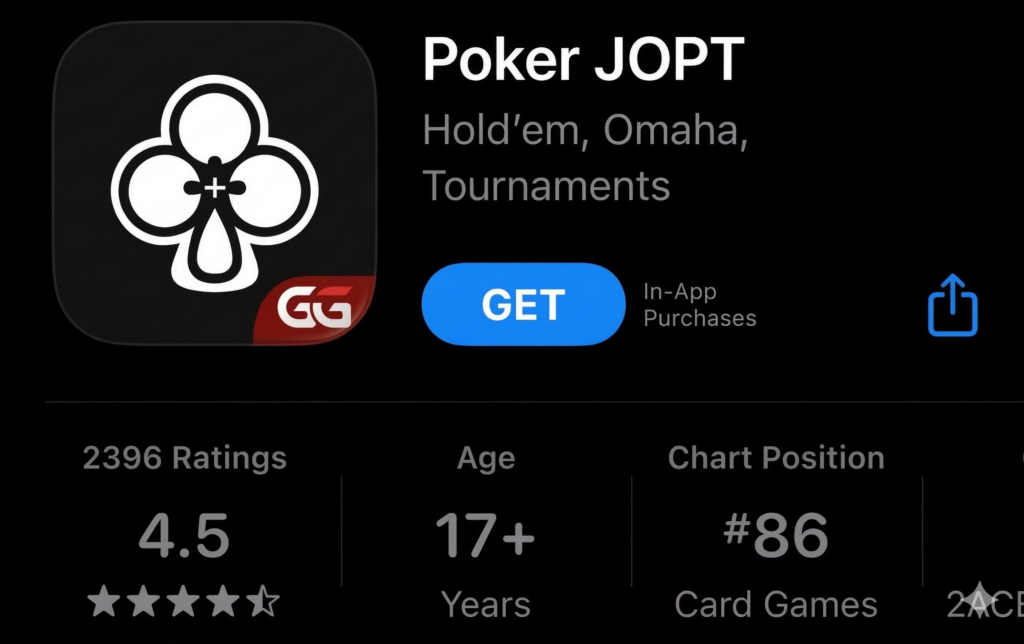
There are many unofficial apps, so please be careful not to download the wrong one.
Smartphone (iPhone)
For iPhone users, search for “GGPoker” in the Apple Store (you can also search for “ggポーカー” or “ggpoker”).
Various poker apps will appear in the search results, but please select “Poker JOPT.” Note that even if you press the download button on the official website (similar to Android), you will be redirected to “Poker JOPT” in the Apple Store.
Press the “Get” button and download it just as you would any other app.
Once the Poker JOPT icon appears on your home screen, the download is complete. Although the name is different, the content is the same as the Android and PC versions, so don’t worry.
Next, follow the steps for “Entering your email address, password, and bonus code” to proceed with account creation and registration.
Smartphone (Android)
For Android users, the GGPoker app is not available on Google Play, so you must download it from the official website.
When you press the download button, an image like the one below will appear, so tap the “Download Now” button.
[画像:Download Nowのボタンをタップします]
When the download starts, a warning saying “This file might be harmful” will appear, but tap “Download anyway.”
Once the download is finished, you will be asked if you want to install the GGPoker app as shown below; tap “Install.”
Once the GGPoker icon appears on your home screen after tapping install, the download is complete.
Next, follow the steps for “Entering your email address, password, and bonus code” to proceed with account creation and registration.
PC (Windows/Mac)
To download the PC (Windows/Mac) app (software), first go to the official website.
There is a red button labeled “Download Now” at the bottom of the screen; please click it.
It will download automatically, and a language selection page will open. Select “Japanese.”
Then, when you click “Install,” a confirmation screen asking “Do you want to allow this app to make changes?” will appear twice. Click “Yes/OK” for both to start the installation.
Depending on your PC specs, the installation will take about 15 seconds to 1 minute.
Once the installation is finished and the GGPoker home screen (not the website) appears, the registration process is ready.
Finally, click the red “Create Account” button in the right sidebar to open your account.
We recommend registering via the button below first; that way, you can start playing just by logging in after installation. You can even get the no-deposit bonus without having to enter it yourself!
\Limited Bonuses!/
Although we are using Windows for this installation guide, the process is naturally the same for Mac.
Enter Email Address, Password, and Bonus Code
After downloading the app, a login screen like the one below will appear. Tap “Create Account.” From here, the steps are the same for both smartphones and PCs.
When you tap “Create Account,” you will first be asked to confirm your country of residence, so select your country.
Once you select your residence, the registration screen will appear. Enter your “Email Address” and “Password.” For the password, lowercase letters and half-width alphanumeric characters are required.
Below the password, it says “Do you have a bonus code?” Tapping this will open an entry screen, so please enter “Recode.”
By entering this code, you can get exclusive great bonuses from this site, such as receiving $20. Also, if you register from the button below, you can easily open an account and skip the hassle of entering a bonus code.
\Limited Bonuses!/
*Separate app download required.
Agreement to Privacy Policy, etc. and Email Confirmation
After entering your email address, password, and bonus code, the next step is agreeing to the privacy policy and other terms.
You can check everything at once with “Accept All,” but please take a look through the privacy policy at least once.
After agreeing and pressing the next page, you will confirm your email address. Enter the 4-digit code sent to your registered email address.
Once submitted and accepted, the account registration/new account creation is complete.
Decide Your Nickname (Account Name)
Once the account creation is complete, you will return to the login screen. Log in using your registered email and password.
A screen to decide your nickname will appear as shown below, so choose a nickname (account name) you like.
This nickname cannot be changed later, so think carefully before choosing.
If you complete everything from registration to this point within 24 hours, you can get an exclusive no-deposit bonus of $20 from this site, so let’s finish it all at once.
Depending on the connection status, it shouldn’t take even 3 minutes from registration to nickname setting if things go smoothly. If you want to start GGPoker at a great value, register using the button below.
\Limited Bonuses!/
Once the nickname setting is complete, proceed to the next step via the button below.
Choose Your Avatar (Character)
After deciding your nickname, next you will choose your avatar (character). You will be taken to an avatar selection page like the image below, so please choose one you like.
GGPoker has a wide variety of characters in the following categories.
- All
- Poker Players
- Fish Characters
- Lucky Charms
- Gods of Gaming
- Historical Figures
- Special
You can change this avatar later, so don’t worry too much and just choose intuitively.
Redirecting to the Browser Deposit Page (No Deposit Necessary)
After selecting a character, entering a name, and pressing the red “Start” button, you will automatically be redirected to a deposit screen in your browser like the one below.
[画像:ブラウザの入金画面]
It is possible to deposit here. For GGPoker payments, you can also choose credit cards such as VISA and Mastercard.
The GGPoker payment methods shown here are as follows.
- LUXON Pay (Cannot be used from Japan)
- Payz (formerly ecoPayz)
- MuchBetter
- Credit Cards (VISA, MasterCard, e-wallet)
- Bitcoin
- USD Coin
If you use a deposit agency, the deposit method changes slightly, so bank transfers and the like are not listed here.
Also, even if you select a payment method, there are many steps before actually paying, so there is no risk of paying by accident. Feel free to tap whatever you’d like to see.
Once you choose a payment method, you will be taken to a page to enter the “Deposit Amount” as shown below. If you want to deposit and play immediately, enter the payment amount and select the payment method.
[画像:支払い金額を入力し決済方法を選択します]
Once you select a payment method, you will be redirected to the payment screen. Confirming the payment will complete the deposit. However, if you deposit here, you won’t receive the first deposit bonus because identity verification (KYC) has not been completed yet.
Since this would be a significant loss, we recommend not depositing here. If you are not depositing, close the browser and return to the app.
When you return to the app, the tutorial will begin.
[画像:チュートリアルが始まります]
If you need it, press the “START” button; if not, you can close it with the × button in the upper right. Once you’re back on the home screen, let’s start playing!
If you haven’t registered for GGPoker yet, please try registering via the button below. By registering through our site, you can get exclusive bonuses that do not require identity verification.
\Limited Bonuses!/
GGPoker Identity Verification (KYC) Methods and Required Documents
On GGPoker, identity verification (KYC) is required when receiving bonuses or withdrawing funds. Identity verification (KYC) consists of two stages: “Identity Verification” and “Address Verification,” and you must pass both.
Here, we will introduce identity verification methods, required documents that are less likely to be rejected, and key points to keep in mind.
List of Required Documents for Identity Verification (KYC) (Identity Verification/Address Verification)
The valid documents required for identity verification and address verification are different.
For identity verification, you need a non-expired photo ID. The documents you can use are as follows.
- Driver’s License
- Passport
- My Number Card
[画像:有効期限の切れていない顔写真付きの身分証明書が必要]
On the other hand, for address verification, you will need the following documents issued within the last three months.
- Utility bills (electricity, gas, water, telephone, etc.)
- Bank statements
- Tax-related documents (tax notices, etc.)
- Documents from the government (depending on content)
- Certificate of Residence (Juminhyo)
[画像:住所証明では3ヶ月以内に発行した書類が必要]
The address listed on your identity verification and address verification documents must match. Additionally, while the Certificate of Residence is listed as valid for address verification, there are cases where it is rejected no matter how many times it is submitted.
To ensure the review process goes smoothly, please take photos with the following in mind:
- Fit all four corners of the document within the frame.
- Take the photo in a bright place so the content is clearly visible.

Identity registration seems difficult.

If you keep the precautions and key points in mind, the application may pass smoothly. For specific points on identity registration, please refer to ‘How to Complete Identity Verification (KYC) on GGPoker! Thorough Explanation of Address Entry and Documents That Won’t Be Rejected.’
How to Complete Identity Verification (KYC) via Smartphone (iPhone/Android)
Identity verification (KYC) follows the order of ① Identity Verification and then ② Address Verification. The steps when performing this from a smartphone (iPhone/Android) are as follows.
Identity Verification from a Smartphone (iPhone/Android)
- Click “My Info” from the top of My Page.
- Click “My Documents” and proceed to the next page.
- Click the green “Manage” button at the bottom of the screen.
- Enter your name, date of birth, and gender.
- Enter your address (written in English notation).
- Upload your identity verification documents (Driver’s License, Passport, My Number Card, etc.).
Address Verification from a Smartphone (iPhone/Android)
- Click “My Info” from the top of My Page.
- Similar to identity verification, click “My Documents” and proceed via “Manage.”
- Upload your proof of address document.
- Select the type of document uploaded (Utility bill, bank statement, tax-related document, government document, certificate of residence, etc.).
“My Info” is located near the My Page icon, as shown in the image below.
[画像:マイページのアイコン近く]
If an error occurs while submitting documents via smartphone, there are cases where the application will pass if submitted from a PC.
Since the basic flow is the same on a PC, if you encounter an error on your smartphone, please try submitting from a PC.
How to Complete Identity Verification (KYC) via PC (Windows/Mac)
The procedure for identity verification from a PC is the same as on a smartphone.
Identity Verification from a PC
- Click “ID Verification” on My Page.
- Enter your name, date of birth, and gender.
- Enter your address (written in English notation).
- Click the button in the authentication request to access the “Identity Document” page.
- Choose the type of document and upload the identity verification document.
Address Verification from a PC
- Click “ID Verification” on My Page.
- Select the image of the address verification document on the authentication request screen.
- Select the type of document.
- Upload the document.
“ID Verification” is located on My Page, as shown in the image below.
[画像:IDの確認はマイページにあります]
Whether on a PC or smartphone, address registration must be filled out in English (Roman letters), so please be careful not to make mistakes.
However, for address entry, candidates will appear just by entering the first few letters, so entering it in English is surprisingly easy.
[画像:GGPokerアプリのキャプチャ画像]
(This address is the first candidate that appeared after entering “a”)
For more detailed methods on getting your identity verification approved smoothly, please refer to “How to Complete Identity Verification (KYC) on GGPoker! Thorough Explanation of Address Entry and Documents That Won’t Be Rejected.”
GGPoker Deposit/Withdrawal Methods and Fee List
Here, we will explain the deposit and withdrawal methods for GGPoker.
It looks convenient with various methods like credit cards and cryptocurrency!
Make sure to enter your numbers in a secure network environment!
GGPoker Deposit Methods
The deposit methods for GGPoker are as follows.
- Click “Cashier” on the right side of the top page.
- Select “Deposit” from “Deposit / Withdrawal / Transfer / Transaction History.”
- On the deposit page, select your payment method.
- Enter the deposit amount.
- Enter card numbers or other details according to the payment method.
- Click the deposit button.
When entering the deposit amount, there is a section to select a bonus. If you haven’t received your first deposit bonus yet, don’t forget to select it.
[画像:入金額を入力する際、ボーナスを選ぶ枠があります]
When depositing via bank transfer through the official deposit agent “GGStore,” you do not proceed through the cashier. Apply via GGStore’s official LINE and follow the instructions to complete the deposit procedure.
[画像:GGStoreの公式LINE]
【GGStore Official LINE】
For those who want to know more about deposit methods for each payment type, please refer to “GGPoker Deposit Methods | Thorough Explanation of All 10 Types Including Deposit Agents, Credit Cards, LINE, etc.!”
List of Minimum Deposit Amounts and Fees
The minimum deposit amounts and fees for GGPoker are as follows.
| Payment Method | Min Deposit ($) | Fee |
| Deposit Agent (Bank Transfer) | 10 | 2~3% |
| Credit Card | 10 | 3~5% |
| Payz (formerly ecoPayz) | 10 | 5% |
| MuchBetter | 10 | 3.5% |
| Cryptocurrency (Bitcoin, USD Coin) | 10 | 0%~ |
If you’re considering fees, cryptocurrency is the most recommended, but considering the effort and speed of reflection, using a deposit agent is the easiest method.
GGPoker Withdrawal Methods
The basic flow for withdrawal is the same as the deposit method.
- Click “Cashier” on the right side of the top page.
- Select “Withdrawal” from “Deposit / Withdrawal / Transfer / Transaction History.”
- On the withdrawal page, select your payment method.
- Enter the withdrawal amount.
- Enter details according to the payment method.
- Click the withdrawal button.
When using a withdrawal agent, select “Transfer” instead of “Withdrawal” and send the dollars to the designated account.
Just like when depositing, instructions will come from GGStore’s official LINE, so proceed with the withdrawal process accordingly.
For more detailed withdrawal methods, please refer to the article “List of 9 GGPoker Withdrawal Methods [Actually Tried Withdrawing].”
List of Minimum Withdrawal Amounts and Fees
Here is a list of minimum withdrawal amounts and fees for GGPoker.
| Payment Method | Min Withdrawal ($) | Fee |
| Deposit Agent (Bank Transfer) | 10 | 2~3% |
| Payz (formerly ecoPayz) | 20 | 4% + Exchange Fee |
| MuchBetter | 20 | 3.5% |
| Cryptocurrency (USD Coin) | 100 | 0%~ |
| Cryptocurrency (Bitcoin) | 1,000 | 0%~ |
Since the unit price of cryptocurrency coins is high, minimum withdrawal amounts tend to be higher as well. If you want to withdraw small amounts, please choose a method other than cryptocurrency.
Additionally, there are several payment methods, such as LINE Pay and credit cards, that allow deposits but do not support withdrawals.
Since deposits and withdrawals generally need to use the same payment method, those who want to earn on GGPoker or continue for a long time should choose a payment method with withdrawal in mind.
If you’re worried about deposits/withdrawals or can’t decide on a method, why not start with the no-deposit bonus?
On our site, you can receive $20 initially even without identity verification, making it easy for those hesitant about depositing to play.
If you are interested in GGPoker, register now!
\Limited Bonuses!/
GGPoker Bonuses and Campaigns
GGPoker has a total of five types of bonuses and campaigns: two types of first deposit bonuses, two types of daily bonuses, and an original no-deposit bonus.
Here, we will introduce the bonuses and campaigns available on GGPoker.
First Deposit Bonus
This is a bonus for your very first deposit. You can choose one of the two types introduced below.
| Bonus Name | Match Bonus | Free Bonus |
| Bonus Content | 100% deposit match bonus up to $1,000 | Up to $100 in tickets and cash + $45 and $15 satellite tickets |
| Recommended For | Those who aren’t hesitant to deposit larger amounts and want to play a lot | Those who want to try playing for fun or find it difficult/are hesitant to deposit large amounts |
Let’s look at each in detail.
Match Bonus
The Match Bonus is a first deposit bonus where you can receive up to double your deposit amount in cash. Deposits made within approximately 2 months (60 days) of the first deposit are eligible, and you can receive a bonus of up to $1,000.
The more you deposit initially, the more you stand to gain from this bonus.
Getting up to $1,000 back is such a great deal!
That’s right. Since the payout condition is $1 for every $5 in rake, it’s a very profitable bonus for those who play a lot.
Free Bonus
The Free Bonus is a first deposit bonus where you can receive up to $100 worth of Spin & Gold tickets and cash.
If you choose this, you will first receive $40 worth of tickets over 6 days. After that, if you participate in the 6-day AoF Challenge and complete all challenges, you can get up to an additional $60.
Furthermore, after completing the challenges, you can receive $45 and $15 GGMasters satellite tickets.
It’s less than $1,000, but the requirements for receiving it seem easy!
Indeed. This bonus is recommended for people who are new to online poker.
Daily Bonuses / Registration Bonuses
GGPoker also offers a wealth of mission-based and daily bonuses aimed at new registrants.
Honeymoon Bonus
The Honeymoon Bonus is a special bonus available to users within 30 days of new registration. The period lasts for 30 days, and every time you clear a mission presented daily by GGPoker, you receive a bonus. The bonuses are diverse, ranging from cash to tickets.
Daily Freebie
The Daily Freebie is what other games would call a login bonus. By logging in once a day, you can receive bonuses such as cash or tickets.
For more details on bonus contents, please check “[Latest Version] Thorough Comparison of GGPoker Bonus Codes!”
[Up to $1,020!] Site-Exclusive No-Deposit Bonus (Bonus Code)

In addition to regular bonuses, GGPoker has special “bonus codes” that allow you to receive unique rewards.
By using our site’s bonus code “Recode,” you get a $20 bonus in addition to all the bonuses introduced so far! By registering through our site, you can get a total of up to $1,020.
No deposit or identity verification is required to receive the $20 bonus.
This $20 has an expiration date of one month, so please play soon after receiving it. If you want to get up to $1,020 and start GGPoker, register using the button below.
\Limited Bonuses!/
If you want to know more about the perks and how to receive our site’s bonus code, please also see “[Up to $1,020] Get a No-Deposit Bonus with GGPoker Bonus Code ‘Recode’!”
Reasons Why You Can’t Register for GGPoker and Solutions
On rare occasions, issues such as being unable to register may occur on GGPoker.
I tried to create a GGPoker account for freerolls, but no matter what password I enter, the error ‘Passwords cannot contain parts of your email address or name’ won’t go away, so I can’t register. What should I do?
— Nutta (@nuuta911) April 19, 2021
Here, we will introduce the causes and solutions for when you cannot register for GGPoker.
Causes for Being Unable to Register for GGPoker
The main reasons why you might be unable to register are as follows.
- The password contains part of your email address.
- You have created an account in the past (duplicate accounts).
- An error on GGPoker’s side.
In the case of (1), you can generally register by changing the password. Also, as long as it doesn’t perfectly match a section of your email address, you can register even if some characters overlap.
What to Do If You Cannot Register for GGPoker
The best solution is to consult the official accounts. If you want a quick reply, consult the official LINE account. Depending on the content, you may get a reply within a few minutes, or at least within 24 hours on weekdays.
[Contact Information]
Official LINE Account: GGPoker JAPAN
Official Twitter: @GGPokerJapan
However, consulting them does not mean all problems can be solved. For example, if you have created an account in the past, the official side may not be able to assist you.
If you still cannot register after inquiring, we recommend playing at another online poker site. For beginners who want to win or earn money through poker, KKPoker is recommended.I
f you register for KKPoker through our site, we provide a $5 registration bonus and a VIP card that makes it easier to earn. If you are interested, please give it a try!
\Limited Bonuses!/
What to Do When You Forget Your Password and Can’t Log In
If you have forgotten your password and cannot log in, you will need to reset it via the “Forgot Password” link on the login screen.
[画像:ログイン画面にあるパスワードを忘れた方]
When you tap the link, a screen like the one shown above will appear. Please enter your registered email address.
[画像:登録しているメールアドレスを入力]
Once entered, press “Next Page.” You will then be asked to confirm your email address; if it is correct, please press “Send.”
[画像:メールアドレスを確認されるので、あっていれば送信をおしてください]
A 6-digit verification code will be sent to your email address.
If you have not received it, please press “Did not receive code” at the bottom left.
[画像:メールに記載されている数字6桁のコード]
Enter the 6-digit numeric code provided in the email into the app screen.
[画像:メールに記載されている数字6桁のコード]
Once you press “Verify,” you will be directed to the screen where you can enter a new password. Please input your new password.
[画像:新しいパスワードを入力]
Once entered, press “Reset.”
[画像:成功ですと出てパスワードの再設定が完了]
A “Success” message will appear, indicating that the password reset is complete.
[画像:新しいパスワードでログインしてください]
After that, you will return to the initial login screen, so please log in using your new password.
How to Play GGPoker and Game Types
Once registration and deposits are finished, it’s time to play. Let’s look at how to navigate the app.
The app is so easy to navigate! Anyone who knows poker will understand it just by touching around.
Even if you aren’t familiar with poker, you can quickly get a feel for it by playing the free games!
Game Types Available on GGPoker
GGPoker offers about 12 types of games.
| Game Type | Game Content |
| All-in or Fold (AoF) | A high-gambling style of poker where you can only choose to “All-in” or “Fold.” |
| Spin & Gold | The prize is determined by a roulette, with a chance to win up to 100,000 times the buy-in amount. |
| BATTLE ROYALE | Compete for No. 1 by passing through three stages with different game formats. |
| Rush&Cash | You can join a new game immediately after folding without waiting for the hand to end. |
| Hold’em | The most popular poker in the world. Compete using a 5-card hand made from 2 hole cards and 5 community cards. |
| PLO | Compete using a 5-card hand made from a combination of 2 cards from 4 hole cards and 3 from community cards. |
| Short Deck | Poker played with cards 6 through A. Unlike regular Texas Hold’em, a Full House is a stronger hand than a Flush. |
| VIP Games | Playable at tables designed for high rollers. |
| Tourney | Tournaments held daily. There are many types of games, so you can choose according to your preference. |
| Flip & Go | Divided into Flip and Go stages. First, an all-in shootout is held in the Flip stage to determine a table winner. Winners advance to the GO stage to compete in a regular tournament. |
| GG Masters | A freezeout tournament where the winner is decided in one day—once you lose, you’re out. |
| MILLION$ | Tournaments featuring only 2-Day events. You can re-participate even if you lose. |
In addition to these, online versions of famous world tournaments like the WSOP are held, and you can participate in live poker.
Furthermore, while it is not poker, you can also play Casino, Slots, and Live Casino games.
For more details on the characteristics of the games you can play, please refer to “[Official Supervision] What is GGpoker? Thorough explanation of app reviews, registration methods, and deposit/withdrawal methods!”
How to Play and Procedures for GGpoker
Although it varies slightly depending on the game, the basic way to play and the procedure for GGpoker are as follows:
- Select the game you want to play from the menu bar
- Press the start button to participate in the game
- End the game and choose whether to continue or quit
Let’s explain this a bit more clearly.
Procedure 1. Select the Game You Want to Play From the Menu Bar
Select the game you want to play from the menu bar. When you click, games will be listed as shown in the image below, displaying the buy-in, number of tables, and number of players. Join by clicking the “Join” button on the right.
[画像:ゲームが並んでおり、バイインやテーブル数、プレイヤー人数などが表示されている]
Note that the displayed content varies by game.
Procedure 2. Press the Start Button to Participate in the Game
When you press the Join button, the start screen will appear. Press the start button to participate.
After this, the poker table and participants will be displayed, and play will begin.
Procedure 3. End the Game and Choose Whether to Continue or Quit
[画像:プレイ後にブランドを待つか選べます]
In regular Texas Hold’em, you can choose whether to wait for the blinds after playing. If you want to review the game content or the quality of your own decisions by looking at your opponent’s cards, be sure to watch closely.
Depending on the game, you may be able to enter a new game immediately, or the game will end and you will return to the home screen. The way to play GGpoker is basically a repetition of this.
GGpoker is very easy to operate, and there are many tables where even those who don’t have much knowledge of poker yet can play a lot without losing significantly. If you want to start poker or play various games, register for GGpoker now.
\Limited Bonuses!/
Settings and Usage After Registering for GGPoker
When you want to change various settings, tap the icon in the upper right of the screen.
[画像:画面右上のアイコンをタップします]
Then, the following screen will appear.
[画像:アカウント画面]
On the account screen, there are the following four menus.
- My Page
- Reward Program
- My Promo
- Settings
Here is a brief explanation of what you can do in each.
My Page
In “My Page,” the following menus are primarily available (only a few are listed as there are many items).
- My Wallet
- Balance History
- Ticket History
- My Avatar
- Messages
- Followed Sellers
- Current Stakers
Simply put, you can manage money, avatars, messages, follows, etc.
These are “common items found on My Page” shared with other apps and web services.
Reward Program (Fish Buffet)
Here, you primarily manage the “Fish Buffet.”
Fish Buffet is GGpoker’s unique rakeback system, which has 25 ranks like the ones below.
[画像:Fish Buffet]
At the top rank, GG Platinum, the rakeback rate is 60%, while the lowest plan, Plankton, has a rakeback rate of 15%.
The rakeback rate refers to what percentage of Fish Points (FP) can be cashed back as money.
For example, to maintain Platinum, you need to earn 5 million FP per year.
5 million!? I can’t earn that much!
Those 5 million FP aren’t poker winnings. It refers to the ‘rake’ (fees) you pay for each play!
The rake varies depending on the table stakes and is automatically deducted. At Platinum, 60% is cashed back, so you can recover 3 million FP out of the 5 million FP that would have originally been paid to the operating company.
In the case of Platinum, 167 FP can be exchanged for 1 dollar, so 3 million FP is approximately 17,964 dollars.
When converted to Japanese yen, it is approximately 1.97 million yen (at 110 yen per dollar).
In other words, simply maintaining Platinum for one year means you get 1.97 million yen.
Of course, this is separate from poker winnings or earned money. Therefore, there are the following advantages:
- The more you play GGpoker, the more FP increases
- As FP increases, the “percentage that can be turned into cash” increases
- Since FP itself increases and the exchange rate improves, it becomes more and more advantageous
Of course, to accumulate that much FP, you need to participate in games considerably and maintain a certain win rate.
Managing these points and ranks is the purpose of this “Reward Program” menu.
My Promo
[画像:マイプロモ]
In My Promo, you can check limited benefits sent to you.
Right after registering, a promotion called “Honeymoon Start” is displayed, as shown in the image above.
Sometimes valuable information you might have missed arrives, so be sure to check it regularly.
Settings
Like other software and apps, this is the screen for various settings.
As a feature unique to GGpoker, you can configure the poker play screen.
[画像:ポーカーのプレイ画面を設定できます]
Customize the background and table to your liking.
Precautions When Registering for GGPoker
There are several things to keep in mind when registering for GGpoker. Check them carefully so you don’t regret it after registering.
You Cannot Have Multiple Accounts Per Person
You cannot have multiple GGpoker accounts. Even with a different email address, account information is linked to the device, so if you register on the same device, your account may be frozen for a violation of terms.
If you want multiple accounts, you must prepare the following:
- A new device
- A new deposit/withdrawal method
Also, if you want to withdraw money, identity verification is required. If you use the same personal information already registered, it will be discovered that it is the same person, and the account may be frozen.
Therefore, you would have to have another person perform the identity registration (KYC).
Enter the Bonus Code at Registration or Within 7 Days
It is actually possible to register the bonus code that grants you great bonuses even after the fact. However, the limit is 7 days. If you exceed the limit, you will not be able to receive the bonus, so we recommend registering it when you open your account.
Our site-exclusive, official GGpoker bonus code that gives you up to $1,020 is “Recode.” If you find it troublesome to type, please register using the button below.
\Limited Bonuses!/
GGPoker Registration FAQ
This section introduces frequently asked questions regarding how to register, download, and use GGPoker.
What kind of App is GGPoker? Does it have any Special Features?
GGPoker is one of the most popular poker apps and sites in the world. Its main feature is that players can participate in world-renowned poker tournaments such as the WSOP, APL, and JOPT directly from within the site.
For those who want to know more about what the app is actually like and read detailed user reviews, please also check out the article: “Is GGPoker’s Reputation Bad? Introducing Who We Recommend It To and Who We Don’t!”
Is GGPoker Safe? Is it Illegal?
Playing GGPoker from Japan is not illegal. Additionally, please rest assured that there are basically no cases of sudden arrests.
The reason GGPoker can be considered a safe online poker site is that it holds a government-authorized license from the Isle of Man Gambling Supervision Commission.
To be issued a government-authorized license from the Isle of Man, a site must pass extremely strict screening processes. Having passed these screenings and hosting players from all over the world, GGPoker can be said to be one of the safest among online poker apps and sites.
Does GGPoker Support Japanese?
GGPoker supports Japanese, and you can also receive support in Japanese. However, be aware that email replies from the official support team may sometimes be in English, or the grammar in certain sections may be slightly unnatural.
The in-app language is also fully supported in Japanese. If your display is in English—perhaps because you initially installed it in English or it switched to English for some reason—you can change it in the settings. First, tap the “Gear” icon on the bottom bar of the screen.
[画像:画面下のバーにある「歯車」のアイコンをタップ]
When you tap this, you will be taken to the “Settings” page as shown below.
[画像:左側のメニューの一番下に「言語」があるので、これを選択します]
“Language” is located at the very bottom of the menu on the left side; select it.
[画像:Japaneseを選択して適用を押す]
Then, the language selection screen will appear as shown above. Simply select “Japanese” and press “Apply” to display the app in Japanese.
Is Identity Verification (KYC) Required for Deposits and Withdrawals at GGPoker?
Identity verification (KYC) is not required for deposits. However, it must be completed when withdrawing funds or receiving deposit bonuses.
The $20 no-deposit bonus available through our site’s bonus code does not require identity verification. Therefore, if you want to play while waiting for your identity verification to be approved, please try playing with this $20.
Since using this $20 does not count as a deposit, you can still receive a bonus of up to $1,000 upon your first actual deposit.
If you want to play poker right now, try registering via the button below.
\Limited Bonuses!/
How Many People Can Play at GGPoker?
Normally, poker is played with 2 to 10 players per table. At GGPoker, you can play with a maximum of 6 people in cash games and a maximum of 8 people in tournaments.
The screen does not get cluttered, and since you can participate with a number of players close to the maximum in live poker, you can enjoy the excitement just like a live game.
Are there Clubs in GGPoker?
GGPoker does not have a “Club” system like KKPoker. Instead, there are “Bonus Codes” that you can enter during registration to receive special benefits.
The bonus code for our site, which grants a special GGPoker-authorized sign-up bonus, is “Recode“. Entering this at registration allows you to get up to $1,020!
If you’re thinking, “I want the bonus, but entering a code is a hassle…”, please register using the button below.
\Limited Bonuses!/
If you want to join a club to receive high rakeback or want to earn money more easily, KKPoker is recommended.
In particular, by joining our site’s club “Oncasirecode,” you not only receive VIP cards and USD upon joining, but it is also a very profitable site with higher rakeback settings than the official standard.
If you are interested in clubs or want to earn money more easily through poker, please register for KKPoker.
\Limited Bonuses!/
Can I Change My Name (Nickname) Later?
You cannot change your name (nickname) later.
Also, please note that email addresses cannot be changed for security reasons. If you absolutely must change it, try contacting official support.
While you may not expect the same level of attentive support as in Japan, there is a possibility it can be changed.
Note that if you open a new separate account to try and change your name or email address, it may be considered a violation of the terms of service and lead to your account being frozen.
Can I Receive Rakeback at GGPoker?
GGPoker has a system called “Fish Buffet” where you can receive up to 60% rakeback across 25 levels. It starts at the “Plankton” level with 15% rakeback.
For details, please refer to the “Rewards Program (Fish Buffet)” section.
For those who want to receive 15% or more rakeback from the start, KKPoker—which has a club system—is recommended. At “Oncasirecode,” one of the largest clubs operated by our site, you can receive more rakeback than the official rate immediately after joining.
First, please join KKPoker via the button below.
\Limited Bonuses!/
I Can’t Take Clear Photos of My Identity Documents. Are there any Tips?
Tips for taking good photos of identity documents are as follow.
- Take the photo in a bright room.
- Avoid placing glossy documents directly under fluorescent lights (to prevent glare/whiteout).
- Keep a certain distance to avoid blurring.
- Ensure all four corners are clearly within the frame.
- If the camera lens is blurry, wipe it with a cloth.
If the text on the document becomes too small when keeping a distance, we also recommend submitting a close-up image along with the full-view photo.
For more tips on photographing documents for verification, please refer to: “How to perform Identity Verification (KYC) for GGPoker! Thorough explanation of address entry and ID documents that won’t be rejected.”
What is Staking?
You can also do “Staking” on GGPoker. Staking means “betting on someone else.“
- Strong players
- Friends
- Players you support
You entrust your funds to these types of people.
The system is such that if they win, you get a share of the winnings, and if they lose, your money is not returned.
In other words, even if you aren’t strong yourself, you can earn money by betting on strong players. Furthermore, it’s not just for earning money; you can also support your friends or favorite players.
Conversely, if you lack the funds to participate in a tournament yourself, you can also solicit investment.
Whether you are the one investing or the one being invested in, staking greatly expands the ways to enjoy poker.
What is PokerCraft?
PokerCraft is a tool for “recording and analyzing play.” Details of your play, such as your past results, are recorded minutely.
Based on this, you can analyze your own play tendencies and use it to improve your strategies.
Additionally, since you can view information about other players as well as yourself, it is also effective for creating strategies tailored to your opponents.
PokerCraft data will not be displayed until you have played a certain number of hands.
For this reason, let’s check it again after you have gained a certain amount of playing experience.
On GGPoker, you can view it from the “PokerCraft” button (located next to the gear icon) at the very bottom of the app.
It can be accessed from both mobile and desktop. For those who want to know more, please refer to the following article.
Register for GGPoker and Start World-Class Poker
GGPoker is an online poker app loved by poker players all over the world.
Because the registration method and identity verification (KYC) are simple, and there are many game types and a wide range of rates, everyone from beginners to experienced players can enjoy it.
From downloading the app to opening an account, verifying identity, and depositing, it is not difficult at all, so please use this article as a guide to starting GGPoker.
If you are unable to register, we recommend consulting official support immediately. Also, don’t forget to enter the advantageous bonus code when registering!
Our site has prepared a special GGPoker-authorized bonus code that allows you to receive a no-deposit bonus. If you want to start GGPoker at a great value, register via the button below or enter the bonus code “Recode“. Don’t miss out on these great benefits!
When signing up for KKPoker, enter the special bonus code “82237” or register via our site to receive luxury rewards!
[Site Exclusive! Limited Bonus]
- No-Deposit Bonus worth up to $24
- Exclusive luxury prize draws
- Rakeback bonuses
[Club Features]
- Over $1,000 in monthly prizes!
- Weekly Freerolls!
- One of the largest official communities with 8,000+ members!
- Exclusive community tournaments!
\Start Playing KKPoker for Free/



Comments