

From the online poker app “KKPoker,” a PC version was released on May 2, 2024.
You can enjoy poker games with the same operations as the conventional smartphone app version, and it is possible to switch seamlessly between smartphone and PC.
In this article, we will introduce the features, download method, and how to play the KKPoker PC version (Windows).
If you want to play at KKPoker with great deals, we recommend joining the Oncaji Record club, one of the largest with over 8,000 total registrants!
[Site Exclusive! Limited Bonus]
- No-Deposit Bonus worth up to $24
- Exclusive luxury prize draws
- Rakeback bonuses
[Club Features]
- Over $1,000 in monthly prizes!
- Weekly Freerolls!
- Club-exclusive free lottery!
There are no difficult procedures for joining. Just download the app, enter the invitation code “82237,” and get your benefits!
Features of the PC version KKPoker
The PC version interface 100% reproduces the smartphone app version, allowing you to operate it with the same feeling as before.
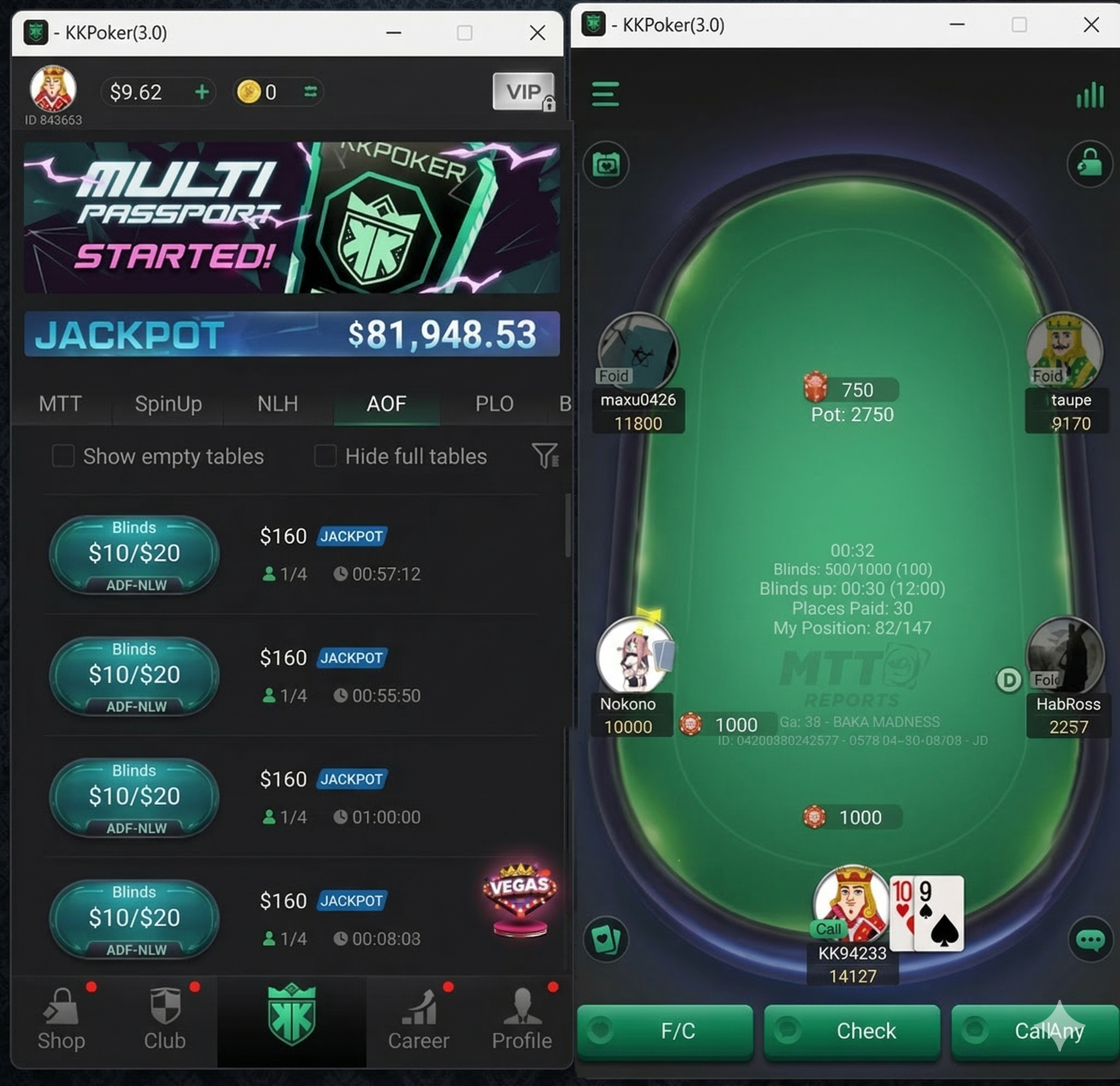
You can now play on a larger screen than the smartphone version, and it can also be used for multitasking.
If you already have a KKPoker account, you will be able to play by logging in with your email address and password.
Method and Procedures for Downloading KKPoker to PC
The KKPoker PC version can be downloaded for free. The download method is as follows.
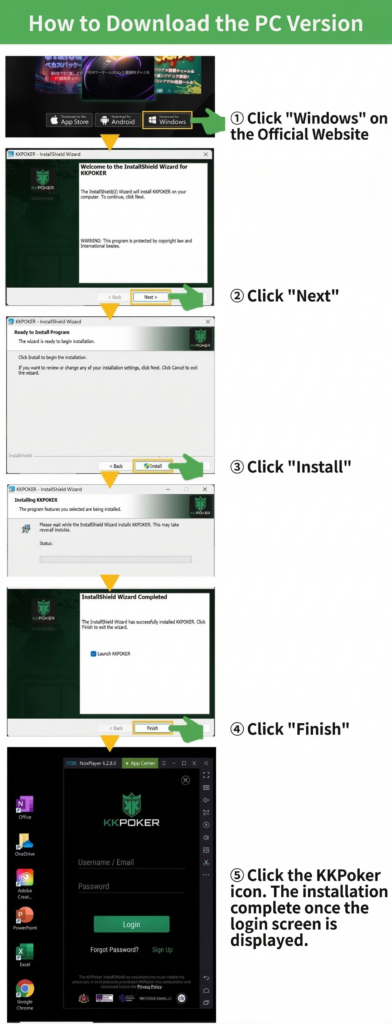
- Access the download page on the KKPoker official website
- Click the “Download for Windows” button to download the installation package
- Click the downloaded package and perform installation according to the contents on the screen
If you are playing KKPoker for the first time and do not have an account, please open an account from the button below first.
By registering as a new user from our site, you can receive special benefits such as a no-deposit bonus worth up to 24 dollars and rakeback settings higher than official.
\限定ボーナスあり!/
For those who want to know the registration method for KKPoker in detail, please refer to the article “KKPoker Registration Procedure.”
Precautions Regarding Account Login
In KKPoker, measures are taken to prevent player misconduct, and only one device can be logged into the same account at a time.
For example, if you log in to the PC version, the account will be automatically logged out from the smartphone app.
Also, just like the smartphone version, Identity Verification Level 2 and IP restrictions will apply to the PC version.
Furthermore, please be careful as creating a new account as the same user may result in usage suspension.
Frequently Asked Questions
Here, we will answer questions regarding the KKPoker PC version.
Are the Game Types the Same for the PC and Smartphone App Version?
Yes. Both versions share the same server, and the player pool and gameplay are the same.
It is possible to switch seamlessly across devices.
Do People who Already have an Account on the Smartphone App also Need to Register as a New User for the PC Version?
With one KKPoker account, you can use either the smartphone version or the PC version.
Furthermore, please be careful as attempting to create a new account may result in failing the Identity Verification Level 2 screening.
Is it Possible to Perform Identity Verification (KYC) from a PC?
Identity Verification (KYC) from a PC can be performed with the same procedures as on a smartphone.
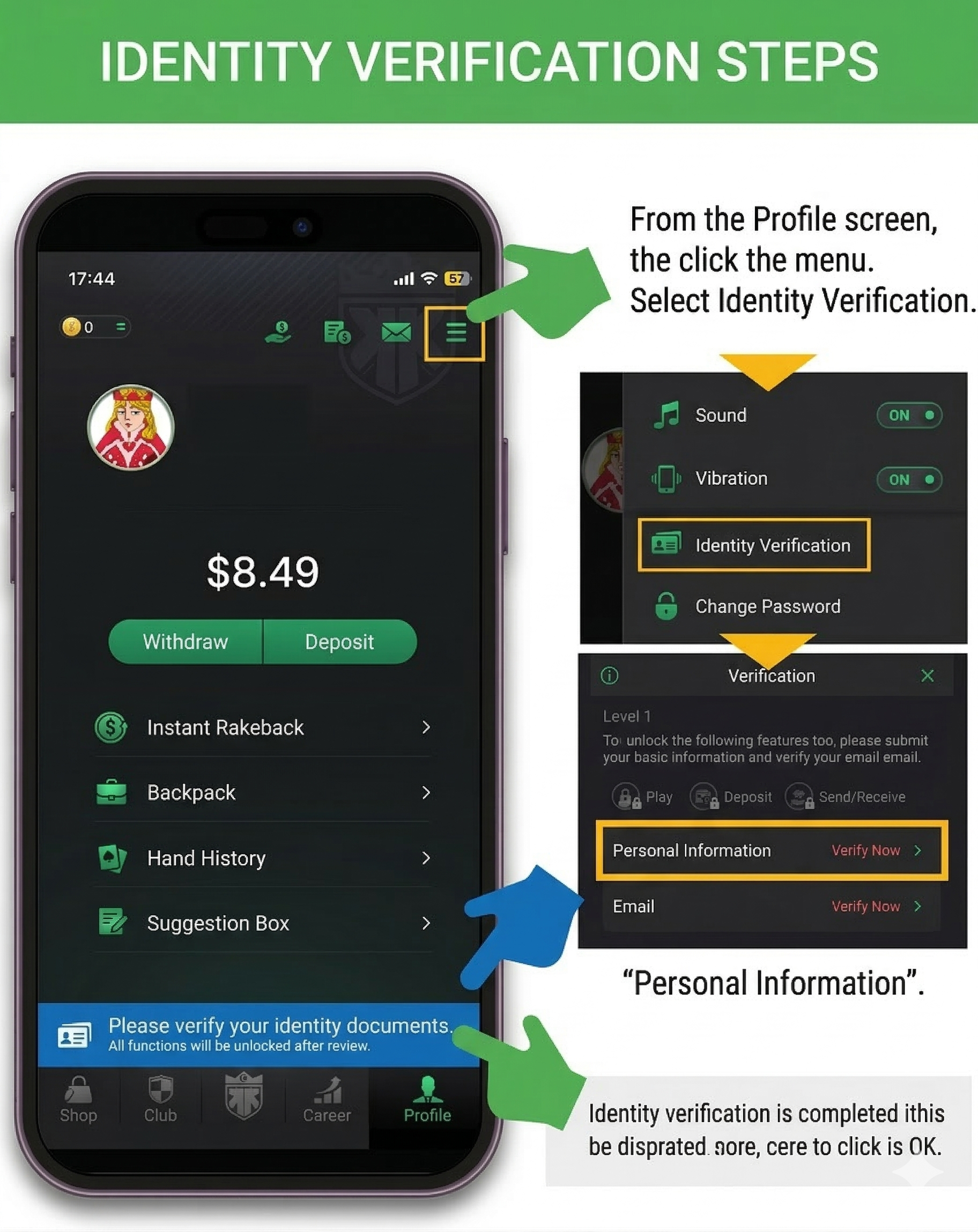
However, for document submission, a smartphone is more convenient as you can take photos immediately.
KKPoker can be Played Comfortably on PC Too!
To play KKPoker on PC, there were methods using external tools such as emulators, but now that the official PC version (Windows) software has been released, it has become possible to play more comfortably.
It is ideal not only for those who are already enjoying KKPoker on a smartphone but also for those who want to start KKPoker from now on.
Referencing the download method introduced above, let’s enjoy KKPoker on PC as well.
\限定ボーナスあり!/